Tuesday, November 6, 2007

Disposable Windows SharePoint Services Objects and Coding Techniques

Frequently, developers call the object model to manipulate data but they don't dipose the object after use it and this may cause unusal behaviors.

  • Frequent recycles of the Microsoft Windows SharePoint Services application pool, especially during peak usage
  • Application crashes that appear as heap corruption in the debugger
  • High memory use for Microsoft Internet Information Services (IIS) worker processes
  • Poor system and application performance

Coding Techniques
You can take advantage of certain coding techniques to ensure that objects are disposed of. These techniques include using the following in your code:

  • using clause
  • try, catch, and finally blocks
  • to retuce Long-Term Object Retention

    [Code Example]
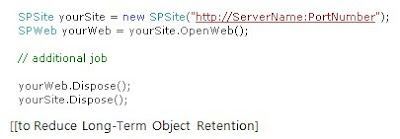

If you want to see more, refer to the SDK.
Remember SDK is your friend near by you always.


------ [Korean] ------
Disposable 가능한 Windows SharePoint Services Objects 과 코딩 기술

SharePoint 개발에 대한 번역서가 없어서인지 국내 SharePoint 개발자들!!! 애로사항이 많습니다. 그리고 돌아다니는 코드 중에 SPSite 와 SPWeb 을 죽여주는 로직이 없는데, 그게 안 좋은 것이라고 MS 가 그러네요... 간단히 List 만 접근하려고 해도 생성하는 것들인데, 특히 웹 파트 등에서 생성하면 꼭 죽여야하고 안 죽이면 불이익?을 당한다는 소리도 있습니다. 저도 왠지 경험한 듯한 기억이 있습니다. 제가 아닌 누군가에 의해... ㅠㅠ 교육을 시켜야할 듯...여튼, 자세한 내용은 당근 SDK 에 있습니다.

  • 잦은 회수, 특히 바쁠때...
  • Debugger 에서의 힙 악영향?, 어플리케이션 충돌 (이거!!!)
  • IIS Process 의 많은 메모리 사용
  • 시스템이 불안하고 성능이 떨어짐

코드 기술은 위를 참조하세요~

SharePointListItemViewer

ListItem is...
Represents an item or row in a list.

[Copy from SDK]
Use the Items property or one of the GetItems methods of the SPList class, or use the Items property or GetItemsInFolder method of the SPDocumentLibrary class to return an SPListItemCollection object that represents the collection of items in a list. Use an indexer to return a single item from the collection. For example, if the collection is assigned to a variable named myItems, use myItems[index] in C#, or myItems(index) in Visual Basic 2005, where index is either the index number of the item in the collection,the internal name, or the display name of a list field. For an indexer based on a name, Windows SharePoint Services first looks for the field by internal name and then by display name.
To assign values to a field in a list item using an indexer, the values must be represented in a format that is appropriate for each built-in field type.

For ListItem Programming...
you need to know internalName of ListItem
That's why I started to make this program.
As you can see, there's an order for fields looks for and I prefer to use internal name because since I got an error for using display name and I read an article for that must use internal name than display name but I don't know what exactly. Anyways, Korean version of SharePoint is totally different between both.


SPListItemViewer is...
simply, print out all SPFields to get Title, InternalName and Item Value and CAML Query can be typed for specific SPListItem.


To download this, Click
here!!!

To test this program, you must run it locally
and read below requirements.

※ Requirements for this Program
1. Windows 2003 Server R2 or with ServicePace 2 installed
2. Runs SharePoint Server locally


------ [Korean] ------
SPListItemViewer 는...
SPListItem 의 Fields 들을 볼 수 있는 프로그램입니다.
ListItem 프로그래밍할때, ListItem 의 값이나 InternalName 을 알고자 할때혹은 CAML Query 등을 테스트하고자 할때 사용합니다. 위 SDK 에서 Field 를 찾을때는, 첫째로 internal name 그리고 display name 을 찾는다고 합니다. 그런데 관련 주제로 검색을 하다보면, internal name 이 대세이더군요... 한글은 직빵 에러이고, 영문은 가끔? 났었던 것 같네요... ^^
영문판이라면 둘의 값이 비슷한데, 한글은 보다시피 알수가 없죠...(어떤 인코딩일지???) ㅠㅠ 어쨌든, 영문판이라 해도 서로간의 혼동을 피하기 위해 internal name으로 코딩하는게 좋을 것 같네요... (뭐 순서만 잘 안다면, indexer 에 숫자를 넣어도 됩니다. --;)
다운로드하려면, 여기를 눌러주세요!!!
코드는 나중에 시간나면, 설명해드릴께요~ (쉬워요~~.)

The best one when you need help

The first, Look for WSS 3.0 SDK thoroughly!!!
(To download, click
here)

If you can't catch any idea from,
then Go to :

1.
MSDN for new one or features.
2.
Google for some advice and code tested or implemented

There are good resources for SharePoint Programming,
MSDN Blog and SharePoint Team Blogs and SharePoint MVP's blog.
Microsoft webcasts and clips on the internet will help you as well
when it's hard to get it or to see what it is... if you find them luckly...
(I got form authentication info from SP team blog)

Currently, I don't have URLs of those but I'll post later soon.


------ [Korean] ------
첫째로, SDK 를 보세요!!!
(다운로드하려면,
여기를 눌러주세요)

SDK 만으로도, 만족을 못한다면...
(보통은 만족하기 어렵습니다.)

1.
MSDN : 새로운 것이 있나...
2.
Google : 관련 내용이나 구현 예제 등을 보기 위해...
위 사이트를 방문하세요!

참고로
MSDN Blog, SharePoint Team Blog, MVP 들의 블로그가 있으니,
한번 둘러보고 관련 내용을 찾아보고 질문 등을 해보세요~
저도 이곳을 통해 폼 인증에 대한 정보를 얻었습니다.

위 사이트의 링크는 현재 이 글을 집에서 작성하는 관계로
다음에~~ 올리도록 하겠습니다.